0、配置文件路径
default.conf所在位置,若未打开过CodeBlocks先打开一次才会有
C:\Users\"Username"\AppData\Roaming\CodeBlocks\default.conf
~/.config/codeblocks/default.conf
1、主题和字体
1、主题:
官网主题
从官网上复制主题代码,将代码粘贴在default.conf文件中,覆盖<colour_sets>的代码段。
1
2
3
4
5
6
7
8
9
10
11
12
13
14
15
16
| <colour_sets>
<default>
<cc>
<editor>
<keywords>
<SET4>
<str>
<![CDATA[__cplusplus __GNUC__ __GNUG__]]>
</str>
</SET4>
</keywords>
</editor>
<NAME bool="1" />
</cc>
</default>
</colour_sets>
|
保存文件后打开 Settings -> Editor -> Syntax highlighting -> Color theme选择 modnokai night shift v2 主题,该主题的光标行为黑色,Settings -> Editor -> Margins and caret -> caret将光标调为白色。
2、字体设置:
Settings -> Editor -> General settings -> Font选择Courier New 字体。
2、代码补全
Settings -> Editor -> General settings -> Code completion -> Autolaunch after typing # letters设置为 2 ,选中 Case sensitive。
Settings -> Editor -> Code completion 1~9 都选中,延时调到200ms 。
Settings -> Editor -> Browse Tracker 选中 Enable Browse Tracker 。
Setting -> Editor -> Syntax highlighting -> Key Words 将下面的单词复制进去一个空集合。
1
2
3
4
5
6
7
8
9
10
11
12
13
14
15
16
17
18
19
20
21
22
23
24
25
26
27
28
29
30
| STANDARD_LIBRARY_NAMES abort ios_base accumulate isalpha allocator islower
auto_ptr ispunct back_inserter isspace bad_alloc istream bad_cast
istream_iterator bind2ndistringstream bitset isupper boolalpha left cerr
less_equalcin list copy logic_error count lower_bound count_if make_pair cout
map dec max deque min endl multimap ends multiset equal_range negate exception
noboolalpha fill noshowbase fill_n noshowpoint find noskipws find_end not1
find_first_of nounitbuf fixed nouppercase flush nth_element for_each oct
front_inserter of stream fstream ostream getline ostream_iterator hex
ostringstream ifstream out_of_range inner_product pair inserter partial_sort
internal plus priority_queuesqrt ptrdiff_t stable_sort queue stack range_error
strcmp replace strcpy replace_copy string reverse_iterator stringstream right
strlen runtime_error strncpy scientific terminate set tolower set_difference
toupper set_intersection type_info set_union unexpected setfill
uninitialized_copy setprecision unitbuf setw unique showbase unique_copy
showpoint upper_bound size_t uppercase skipwsvector sort STRING_EXPORTS append
assign at begin c_str capacity clear compare copy data empty end erase find
find_first_not_of find_first_of find_last_not_of find_last_of getline insert
length max_size push_back rbegin rend replace reserve resize rfind size substr
swap CPP_ITERATOR size_type iterator const_iterator input_iterator
output_iterator forward_iterator bidirectional_iterator random_iterator
reverse_iterator CPP_USER T N Any fout fin algorithm ofstream regex regex_match
cmatch smatch regex_search regex_replace STANDARD_C_I_O clearerr fclose feof
ferror fflush fgetc fgetpos fgets fopenfprintf fputc fputs fread freopen fscanf
fseek fsetpos ftell fwrite getc getchar gets perrorprintf putc putchar puts
remove rename rewindscanf setbuf setvbuf sprintf sscanf tmpfile tmpnam ungetc
vprintf vfprintf vsprintf STANDARD_C_STRING_AND_CHARACTER atof atoi atol isalnum
isalpha iscntrl isdigit isgraph islower isprint ispunct isspace isupper isxdigit
memchr memcmp memcpy memmove memset strcat strchr strcmp strcoll strcpy strcspn
strerrorstrlen strncat strncmp strncpy strpbrk strrchr strspn strstr strtod
strtok strtol strtoul strxfrmtolower toupper
|
3、自定义模板
Settings -> Editor -> Abbreviations点击 Add 添加模板,将下面的代码复制到模板中。
1
2
3
4
5
6
7
8
9
10
11
12
13
14
15
16
17
18
19
20
21
22
23
24
25
|
#include<bits/stdc++.h>
#define rep(i,s,e) for(int i=s;i<=e;++i)
#define per(i,s,e) for(int i=s;i>=e;--i)
typedef long long LL;
namespace ysf{
void debug(int x){printf("___%d___\n",x);}
void debug(int x,int y){printf("___%d %d___\n",x,y);}
void debug(LL x){printf("___%lld___\n",x);}
void debug(LL x,LL y){printf("___%lld %lld___\n",x,y);}
void debug(double x){printf("___%.10lf___\n",x);}
void debug(double x,double y){printf("___%.10lf %.10lf___\n",x,y);}
};
using ysf::debug;
const int N=1e6+10,MOD=1e9+7;
const LL INF=1<<30;
int main(){
return 0;
}
|
4、其他
1、左边行数栏宽度设置:Settings -> Editor -> Margins and caret -> Left margin 设置为 0 ,选中Dynamic setting
2、快速注释设置:
Settings -> Editor -> Keyboard shortcuts -> Edit -> Comment 设置为 Ctrl + / 。
Settings -> Editor -> Keyboard shortcuts -> Edit -> Uncomment 设置为 Alt + / 。
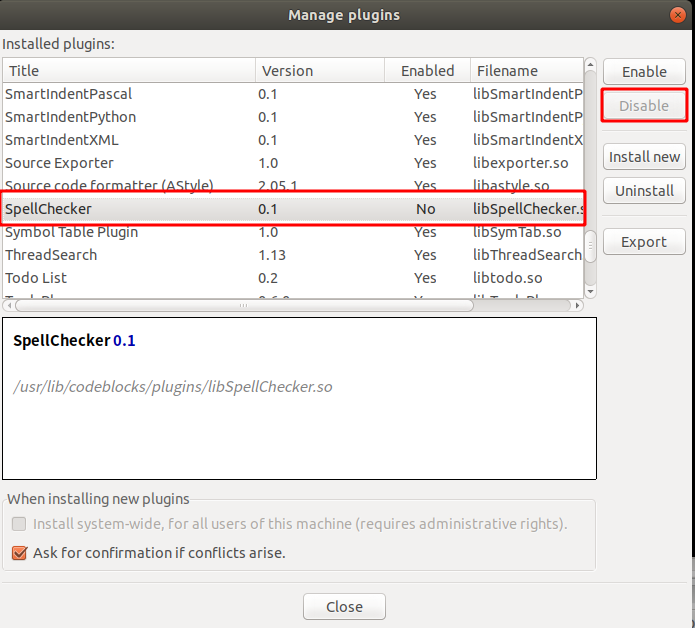
5、关闭拼写检查
1、打开插件管理器
Plugins -> Manage Plugins
2、在插件列表中找到 Spell check并关闭
6、个人配置